

If you’re serious about gaming peripherals, even your mouse pad matters.
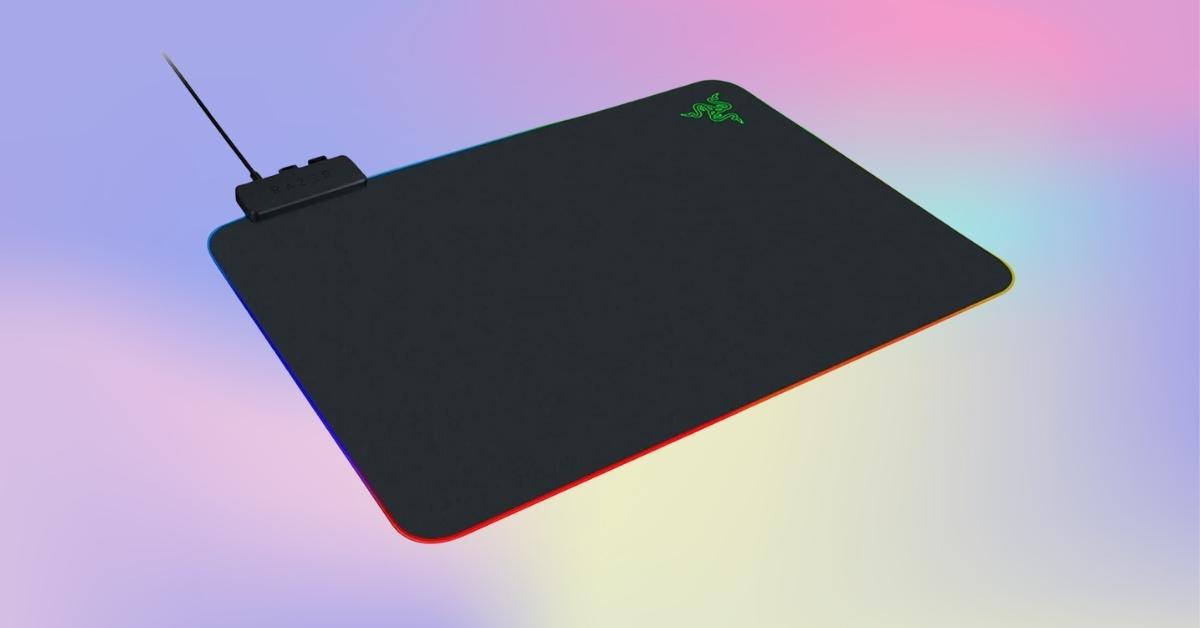
The Razer Firefly Hard V2 RGB Gaming Mouse Pad delivers bright RGB lighting and a performance-tuned playing surface that upgrades how your mouse feels and tracks.
On Amazon US, this pad typically sells around $49.99 for a new unit, making it a mid-range choice for gamers who want more than a basic surface.
Here’s a closer look at how it performs, what stands out, and whether it fits into your gaming setup.
What You Get with the Razer Firefly Hard V2 RGB Gaming Mouse Pad
When you first place the Razer Firefly on your desk, the difference shows immediately.
This hard gaming surface combines customizable Razer Chroma mouse mat lighting with a micro-textured hard surface mouse pad engineered for precise movements and consistent sensor readings across styles of play.
The slim profile keeps your wrist low, helping you focus on speed and control during long sessions.
Design, Build Quality, and Practical Features
Slim, Solid, and Stable
The Firefly Hard V2 stays perfectly flat and secure thanks to its anti-slip rubber base. At about a 3 mm thickness and standard desktop footprint, it doesn’t hog desk space.
The build feels durable under everyday use, resisting scratches and wear even after extended play.
Cable Management Built In
A thoughtful addition is the built-in cable catch that keeps a wired mouse’s cord from dragging or pulling on the surface. For many players, that subtle improvement noticeably steadies full-speed swipes — especially in competitive titles.
Lighting That Adds Personality to Your Rig
A big reason people choose this unit over basic mats is the RGB gaming surface experience.
- 19 customizable lighting zones wrap around the edges.
- Supported by Razer Synapse software for endless color and effect choices.
- Works with other Razer peripherals so your RGB ecosystem feels unified.
Out of the box, lighting works with default patterns. Installing Synapse unlocks effects like reactive lighting tied to mouse clicks or breathing gradients.
The brightness is strong enough for both well-lit rooms and mid-dark setups. Complete control does require the Synapse app, which some users note is a necessary step to get the most out of the lighting system.
Real Testing: How It Plays In Games
Tracking Precision and Glide
The hard surface gives a consistent glide that feels faster than many cloth pads. This makes it appealing if you want a clear speed vs. control balance — you can whip across the screen and still stop on target.
Competitive shooters, MOBAs, and strategy titles all benefit from a surface where sensors don’t lose track in the center or edges.
Compatibility and Sensor Performance
During weeks of testing with both optical and laser mice, sensor tracking remained accurate. There were no noticeable acceleration issues or jitter — important if you’re pushing high DPI or low CPI settings.
Comparison to Other Pads
Cloth pads typically feel softer but slower in fast flicks; the Firefly’s textured hard surface shows a clear edge for responsive movement.
Against a basic mouse pad with cable management, this one’s lighting and micro-texture make the experience sharper and more tailored to performance.
Software, Customization, and Integration
To go beyond static lighting, Razer’s Synapse software lets you customize almost every aspect:
- Change colors of individual zones.
- Create profiles for different games.
- Pick effects like waves, reactive responses, and gradients.
Effects can tie into supported games, giving lighting feedback based on in-game events — a fun bonus that enhances immersion.
Synapse runs smoothly in the background with
Market Context and Value
Gaming peripherals continue to grow as an industry, and so does the market for specialized mouse pads.
The global gaming mouse pad market was valued at around USD 1.2 billion in 2023 and is projected to expand significantly over the coming decade.
RGB mouse pads, in particular, are becoming more popular as gamers look to optimize aesthetics alongside function.
At about $49.99 on Amazon US, the Firefly positions itself between basic hard pads under $30 and premium RGB options above $80.
Its blend of performance features and lighting gives it strong appeal if visual style matters to you.
Potential Limitations
A couple of trade-offs are worth noting:
- Full lighting customization requires software, which some prefer to avoid.
- Hard pads can feel slick compared to cloth if you’re used to a softer surface.
- If RGB isn’t a priority, you can find solid performance-first hard pads for less.
These points don’t diminish the Firefly’s quality but help set proper expectations if aesthetics aren’t part of your priority list.
Final Thoughts
For a performance-oriented PC gaming mouse pad with robust lighting and thoughtful design, the Razer Firefly Hard V2 RGB Gaming Mouse Pad is a strong contender.
The RGB gaming mouse pad market has grown as players adopt customizable setups, and this model balances lighting, build quality, and tracking precision well.
If you enjoy an immersive setup with synchronized lighting and want a surface that supports fast reflexes and precise control, exploring this mouse pad on Amazon can add both function and flair to your desk.
There are other interesting peripherals and accessories worth browsing there too — take a look and find what fits your gaming needs best.
 Advertising Disclosure